
How to Become a Content Creator and Make Money in 2027

So you want to become a content creator and make money. Sounds exciting, right? After all, we know our favorite bloggers, YouTubers, and social media influencers are doing it.
As of 2026, there are over 200 million content creators online, and that number continues to grow. As for making money, the average content creator makes over $40,000 a year. So yes, there’s definitely money to be made as a content creator!
But there is a catch: you won’t make money right away. Whether you make money and how much you make will depend on the quality of your content and the size of your audience.
Building an audience and making money can take weeks, months, and yes, even years. This is something you’ll need to accept if you’d like to try content creation as a source of income.
In this article, I’ll show you how to create and monetize your content and offer tips along the way based on my experience. Let’s begin.
What Is Content Creation?
Content creation is the process of publishing content for an online audience, often with the intent of making money. Creators use content to entertain, educate, or inspire their audience.
Most content creators fall under one of these categories:
- YouTubers, who run YouTube channels
- Bloggers, who write educational blog posts
- Podcasters, who host podcast shows
- Influencers, social media users who use their personality to influence their followers
- Newsletter creators, who send regular newsletters to their followers via email
Note that content creators are not the same as content marketers. Marketers publish content on behalf of a big brand to try to sell its products. Creators, on the other hand, focus on making money through their community of followers.

How to Become a Content Creator
If you’re already a content creator, you can jump to how to monetize your content here.
Step 1: Pick One Platform
There are many different places to create content online. Each platform has its own audience and its own unique reason for existing. If you’re new to content creation, consider exploring the content on each platform to help you decide which one is right for you.
Here are the most popular platforms to create content. These platforms have a large audience potential for you to start making money.
Check out my money-making guide for each platform by clicking the platform’s name.
| Platform | Content type | Monthly users worldwide | Audience age groups |
|---|---|---|---|
| YouTube | Videos of all types | 2.7 billion (source) | 25-34 (21%) 35-44 (19%) |
| Blogging | Articles with useful information | Depends on traffic sources | Depends on traffic sources |
| Podcasting | Audio shows that educate or entertain | 167 million in the US alone (source) | 25-44, according to Podchaser |
| Posts with images, videos, and Reels (vertical videos) | 3 billion (source) | 25-34 (24%) 35-44 (19%) | |
| Images and videos with captions | 3 billion (source) | 25-34 (33%) 18-24 (30%) | |
| TikTok | Vertical videos | 2.21 billion (source) | 25-34 (40%) 18-24 (26%) |
| Snapchat | Images and videos that tell stories about the creator | 956 million (source) | 18-24 (35%) 25-34 (25%) |
| X (Twitter) | Opinion-based posts with images and videos | 557 million (source) | 25-34 (38%) 18-24 (32%) |
| Photos and infographics | 578 million (source) | 30-49 (35%) 18-29 (34%) |
💡Tip: Pick just one platform and don’t pick a second one until you’ve mastered making money with the first one.
For a deeper dive into how to make money on each platform, check out my guides below.
Step 2: Find Your Niche
A niche is an area of interest that attracts a specific audience, like travel, finance, health, cooking, etc. By picking a niche, you know what content to make, and your audience knows what content to expect.
The most important tip is to pick a niche you’re passionate about. If you’re not interested in the niche, your content won’t be as good, and you’ll have a hard time getting people to stick with you.
Here are the most popular niches you can choose from.
| Niche | Sample topics | Popular platforms | Beginner-friendly? |
|---|---|---|---|
| Personal finance | Side hustles, how to invest money | Blogging, YouTube, podcasting, X | No, you must build trust |
| Technology | iPhone review, how to update Windows | Blogging, YouTube, Facebook | No, you must be a tech expert |
| Health and fitness | Diets for weight loss, easy workouts | Blogging, YouTube, Facebook, Instagram | No, you must have credentials |
| Recipes and cooking | Chocolate chip cookie recipe | Blogging, YouTube, TikTok, Pinterest | Yes |
| Gaming | How to level up fast in Valorant | Blogging, YouTube, podcasting | Yes |
| Travel and adventure | what to do in the philippines | Blogging, YouTube, Instagram, Pinterest | Yes |
| Lifestyle | Content about your life, life advice, parent tips | YouTube, Instagram, TikTok, Snapchat, Pinterest | Yes |
| DIY (how-to content) | How to make your own wreath | Blogging, YouTube, TikTok, Pinterest | Yes |
💡Tip: To help you decide, close your eyes and come up with at least 5 things that interest you. Then open your eyes and find one niche in this list that is closest to one of your 5 interests.
Step 3: Create a Unique Angle
Nowadays, it’s not enough to just have a niche because there are so many creators picking the same niche. To solve this problem, you need a distinctive content angle that makes you different from other creators in your niche.
One way to come up with a content angle is to fill in the following sentence:
I will post content about ___ (niche) that helps ___ (what type of people) solve this one problem: ___ (common problem in your niche)
Now, instead of creating content on thousands of topics, you will only cover topics tailored to a specific type of person (like a beginner, a stay-at-home mom, or a teenager) and that help solve the one problem you’ve selected.
For example, my WebCents content angle helps beginners like you make your first dollars online through surveys, user testing, or content creation. That way, I’m not spreading myself thin across ecommerce, freelancing, and work-from-home topics.
So go ahead, write down this sentence and fill it in with your answers. Then keep it somewhere safe to help remind you of what topics to focus on for your content.
One more thing: if you’re in the lifestyle or entertainment niches, develop a content angle that reflects your unique personality and preferences. In other words, be yourself!
Step 4: Prepare Your Toolkit
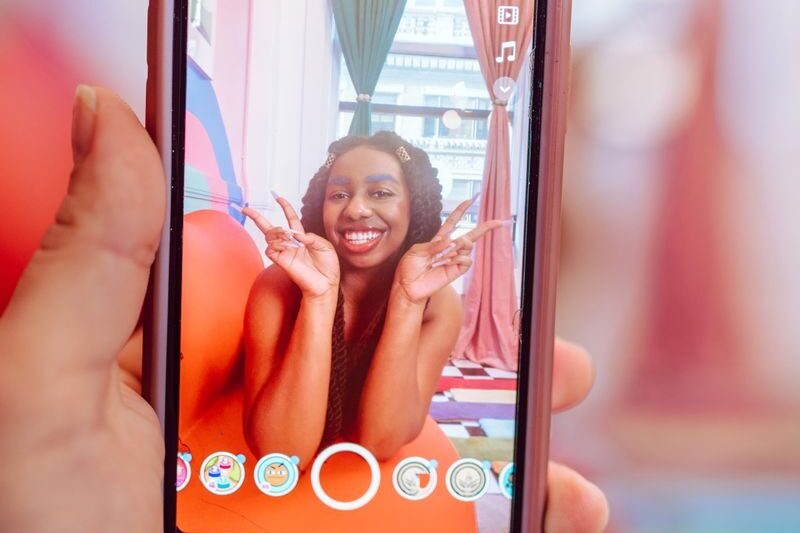
Now let’s make sure you have the tools needed to become a content creator. Some are free, while others require spending some money. But don’t worry: I don’t want you to spend too much money, so I’ll only mention a paid tool if it’s absolutely necessary.
Here are the tools you need depending on what platform you choose:
| Platform | Tools you need | Estimated cost |
|---|---|---|
| YouTube | Camera, microphone, OBS Studio for screen capturing, and CapCut for video editing | Free (if using your existing camera, PC, or smartphone) $300-$700 (for professional camera and microphone) |
| Blogging | Web hosting, domain, and a CMS like WordPress | $100-$200 a year |
| Podcasting | Microphone, podcast hosting, and Audacity for audio editing | Free (if hosting with Spotify) $50-$100 a year (for independent hosting) |
| Camera, microphone, and CapCut for video editing | Free (if using your existing camera, PC, or smartphone) $300-$700 (for professional camera and microphone) | |
| Camera and Affinity for photo editing | Free (if using your existing camera or smartphone) $300-$600 (for professional camera) | |
| TikTok | Smartphone and CapCut for video editing | Free |
| Snapchat | Smartphone and CapCut for video editing | Free |
| X (Twitter) | Computer or smartphone | Free |
| Canva for designing pins | Free |
Step 5: Adopt a Content Workflow
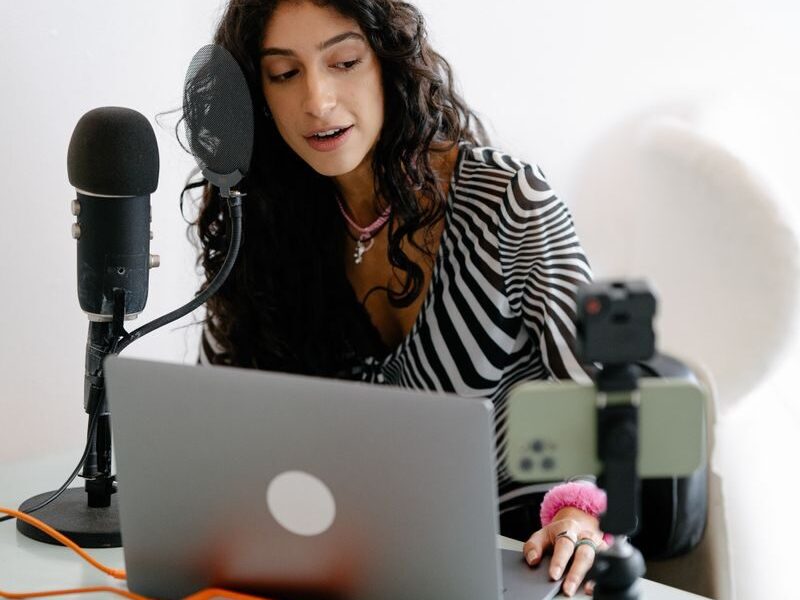
A content workflow helps you focus on doing the work. Without a workflow in place, it’s easy to stop and wonder, “Am I doing this right?” or “Maybe I shouldn’t start until my blog or social profile is perfect.” Content creation takes many long hours to do, so every hour you spend should get you closer to making money, rather than overthinking that gets you nowhere.
Now, your exact workflow will depend on your platform. Here are some sample workflows you can use, but feel free to create your own and figure out what setup works best for you.
For Bloggers
According to Google Search Central, Google values websites that provide “original information, reporting, research, or analysis.” This means if you want your blog to show up on Google and AI answers, you should do deep research on the topic before you start writing. Here’s a sample workflow you can use for every article you write:
- Find a topic related to your niche and content angle.
- Research multiple websites that answer this topic.
- Take down notes as you go using a tool like Notion.
- Start writing with the notes you’ve gathered.
- If you’re unsure, research again and don’t try to guess.
- Fact-check and proofread your work, then publish.
How often you should publish an article depends on your niche. But remember: your articles must be helpful, so take as long as you need to research and rewrite until your article is truly valuable.
For YouTubers
On YouTube, video quality matters. Before making your first video, practice talking clearly and learn how to use your video editing app. You will also need to be in a quiet room free of distractions. Then adopt a workflow similar to this:
- Find a topic related to your niche and content angle.
- If you’re teaching, research, take down notes, and write a script you can read using Notion.
- Record with your camera or, for a faceless video, you can simply record your voice.
- Record your screen if you are playing a game or showing something on your computer.
- Use CapCut or another video editor to put your clips together.
- Play your video, export if satisfied, and upload to YouTube.
Navigate Video recommends posting high-quality YouTube videos consistently, rather than too frequently. Most YouTubers can create videos weekly. But if it takes you two weeks to create an excellent video, publish every 2 weeks or monthly.
For Podcasters
When doing a podcast, focus on talking clearly and practice using Audacity to record and trim unnecessary clips. Your workflow might look like this:
- Find a topic related to your niche and content angle.
- If you’re teaching, research, take down notes, and write a script you can read using Notion.
- Use Audacity to record yourself talking (you can ad-lib or read off a script).
- After recording, use Audacity to add music and sound effects and trim your narration as needed.
- Play your audio, export if satisfied, and upload to your podcast.
Data from Buzzsprout show that most podcast episodes are released weekly. But if you need more time to create a good episode, make it every 2 weeks as long as you’re consistent.
For Social Media Influencers
As an influencer, you’ll publish posts that represent who you are. If you’re into technology, you can comment on the latest gadget releases or share fun computer facts. If you like making people smile, post memes and skit videos. Or you can do a bit of both if that reflects your personality. Basically, just be yourself every time you post.
If you’re on Pinterest, focus on creating visually interesting pins. This can be photos you took along with captions for context, or infographics that can educate viewers.
Based on Hootsuite’s research, here’s how often you should post on social:
- 3-5 posts a week on Instagram
- 1-2 posts a day on Facebook
- 2-3 posts a day on X
- 3-5 posts a week on TikTok
- 1 post a week on Pinterest
Content Calendar
Once your workflow is ready, fill out your content calendar. Mark on your calendar what tasks you want to accomplish on what days. This will help you stay productive and committed to your content. But remember to include days to take a break for your mental health.
💡Tip: AI can help speed up your work as a content creator by writing post drafts, researching topics, and organizing your notes for you. But don’t let AI replace you as the creator. Make sure your content carries your voice, your personality, and your unique perspective.

Step 6: Stay on Topic
In order to help people discover your content, you must stay on topic in every post you make. By staying on topic, search engines, platform algorithms, and AI assistants can better understand what your content is about. They can then recommend it to people searching for your type of content.
Depending on how many creators you’re competing with in your niche, it can take weeks, months, or even years before you get followers. Until then, keep publishing quality content, stay on topic, and be consistent. Eventually, your audience will come.
6 Ways to Make Money as a Content Creator
Once you have an audience built up, you’re ready to try monetizing your content. Below, I’ve listed seven legit ways you can monetize your work as a content creator.
Here’s a summary of how each method compares. Keep reading to learn more about each one.
| Method | How it works | Eligible platforms | Beginner-friendly? |
|---|---|---|---|
| Affiliate marketing | Brand pays you a percentage of every sale of their product | Any platform | Yes, but can be time-consuming |
| Display/video ads | Brands pay you to show ads alongside your content | Blogging, YouTube, podcasting, Facebook, Instagram, Snapchat | Yes |
| Creator fund bonuses | Social platform rewards you for being an active creator | YouTube, Facebook, Instagram, TikTok | Yes, but can be time-consuming |
| Fan funding | Your audience gives you donations | YouTube, Facebook, Instagram, TikTok, X | Yes |
| Brand partnerships | Brands pay you to create content about their products | Any platform except X | No, communication is important |
| Email newsletters | Sell your newsletter or let brands pay you to show sponsored ads | Any platform | No, you need writing skills, which can be learned |
1. Affiliate Marketing
Pros ✅
- No need to stock up on products
- No need to issue refunds
- No support tickets to answer
- You can scale your online income
Cons ❌
- Sellers can change your commission or stop paying you
- You must update your content if sellers change their products
Affiliate marketing means promoting other sellers’ products rather than your own. As an affiliate, you promote a product to your audience and send them to your affiliate link. If they buy, the seller pays you a commission, a percentage of the sale.
Commissions tend to be smaller for physical products because of inventory costs, whereas digital products tend to pay you higher commissions.
Here are the steps to start doing affiliate marketing.
Join an Affiliate Program
There are several ways to join an affiliate program, depending on what platform you’re on.
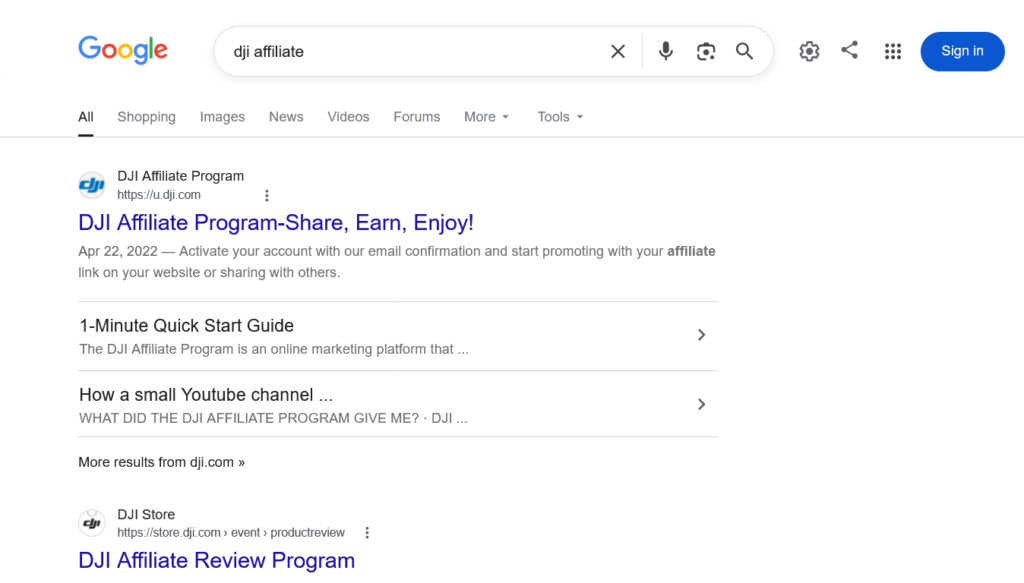
If you’re a blogger or YouTuber, and you already know the product or brand you’d like to promote, use Google or AI to check if they have an affiliate program, like this:
If you’re not sure what to promote, you can join an affiliate network like Later, Impact, CJ, or Awin. These networks can give you a list of brands you can promote. You can also use your Facebook or Instagram creator dashboard to find an affiliate program.
Here are some popular affiliate programs used by creators:
| Program name | Product you will promote | Recommended niches |
|---|---|---|
| Amazon Associates | Products sold on Amazon | Fashion, lifestyle, DIY, technology |
| Airbnb Affiliate Program | An Airbnb place to stay | Travel |
| Skillshare Affiliate Program | A creative writing or art course | DIY or any creative niche |
| NordVPN Affiliate Program | A VPN for online privacy and security | Lifestyle, technology |
| Kit Affiliate Program | An email marketing program | Finance (make money online) |
| TikTok Shop | Products sold on TikTok | Fashion, lifestyle, DIY |
When you sign up, you’ll fill out an application and submit it for review. It can take hours, and in some cases, days for you to be approved. Keep in mind some programs may require you to use a certain platform or have a specific follower count before you can join.
💡Tip: If you’re a YouTuber, try joining the YouTube Shopping affiliate program. This will let you tag products featured in your videos. Tagged products will appear to your viewers as QR codes or banner affiliate links on top of your video. You’ll need to apply for the YouTube Partner Program to access the affiliate program.
Save Your Affiliate Link
Once you’re in the program, find your affiliate link, copy it, and keep it in your notes. This link is the only way you will get credited for sales you make through your recommendations.
If your affiliate link looks ugly, you can use a link shortener like Bitly. Or if you’re a blogger, I recommend the PrettyLinks plugin so you can hide your affiliate link behind your domain.
Introduce Your Product Naturally
There are several ways you can introduce your affiliate product to your audience:
- A product review: this is the best way to promote a product. Explain what it is, the features, and your experience using it. You’re most likely to get affiliate clicks this way.
- A product comparison: if you have experience with two or three products, you can test them in different areas (like speed, storage, and ease of use if you’re comparing computers).
- A how-to or tutorial: show viewers how to do something step by step using the items or tools you’re promoting.
- A sponsored segment: interrupt your topic to talk about a common problem, then introduce the product and how it can solve that problem. The downside is that this can look a bit salesy.
The most important thing is to keep it natural and try not to sound like an advertisement.
Add Your Affiliate Link
If you’re blogging or writing a social media post, include the affiliate link as a hyperlink or a button. Make sure the call-to-action is friendly, like “Check the Price for X Product” rather than just “Get Started” or “Click Here.”
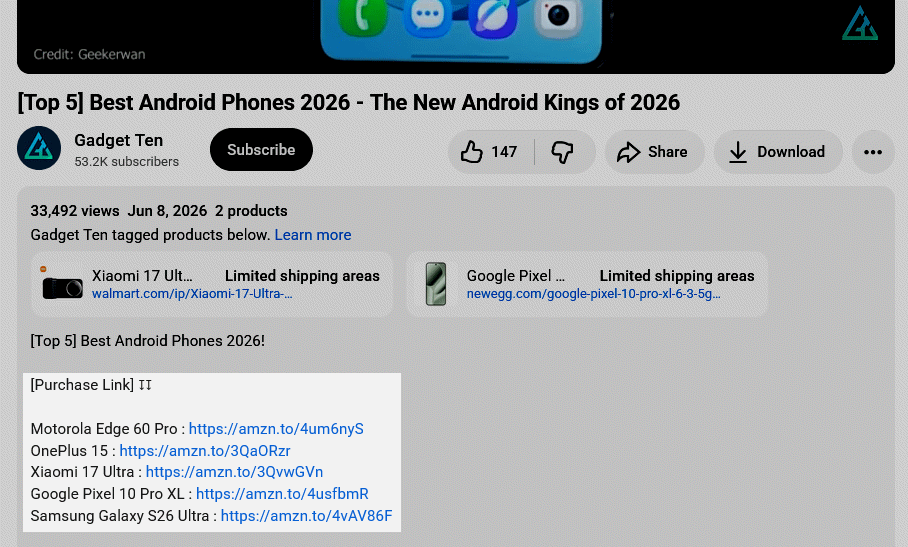
For photo or video content, you’ll include the affiliate link in the description or caption box. Some social media platforms like Facebook will display your affiliate link as a banner on top of your video. Also, note that platforms may have restrictions on posting affiliate links. For example, as of 2026, Instagram only allows affiliate links from select platforms and in select countries.
Write an Affiliate Disclosure
You must also write an affiliate disclosure for marketing transparency and to comply with the US Federal Trade Commission. Include it near your affiliate link or at the top of your blog post. Platforms like TikTok have a toggle that generates a disclosure for you.
If you’re promoting something on Amazon, you must write something like: “As an Amazon Associate, I will earn a commission if you purchase through my link.”
How Much You Will Make
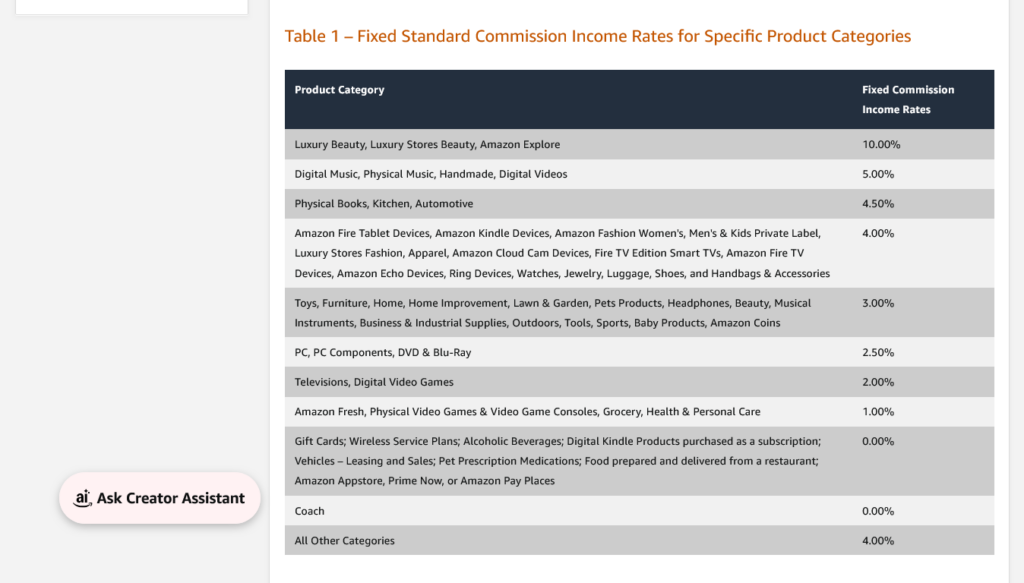
You will earn each time someone buys the product you promoted. How much you make will depend on the product’s posted commission rate. You can look that up in your affiliate dashboard.
Here’s the commission rate for every type of product on Amazon:
After following these steps, you should see commissions come in some time after publishing your content. If you’re not making money, review these steps again and check to make sure your affiliate link is working correctly.
2. Display/Video Ads
Pros ✅
- Simple and easy to set up
- No need to post extra content
- You earn when someone sees your ads
Cons ❌
- You must be careful with your content
- Ad networks can be strict
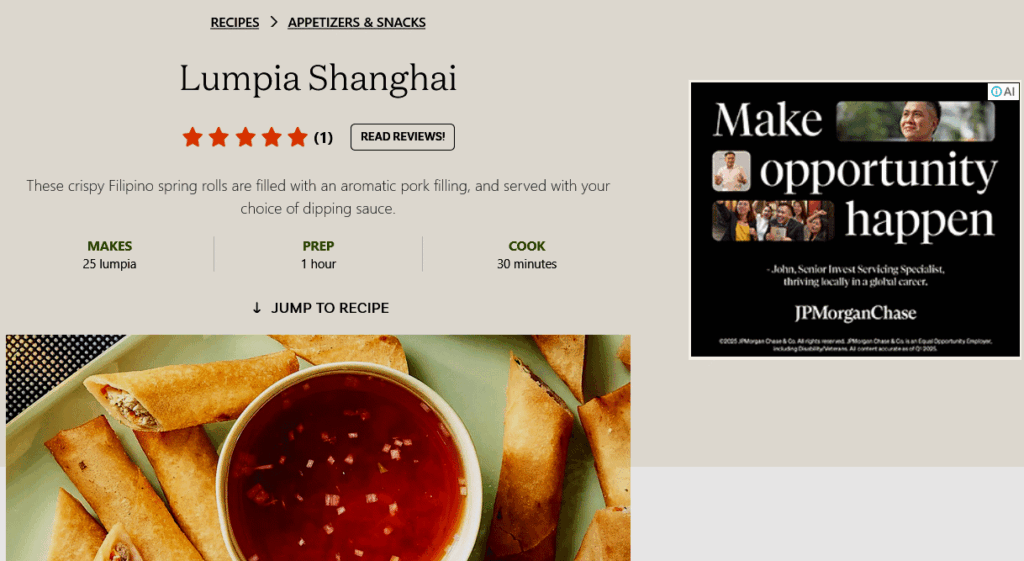
You can earn money by allowing ads to appear on your content. Advertisers pay money to have their ads appear in content where they can find potential customers.
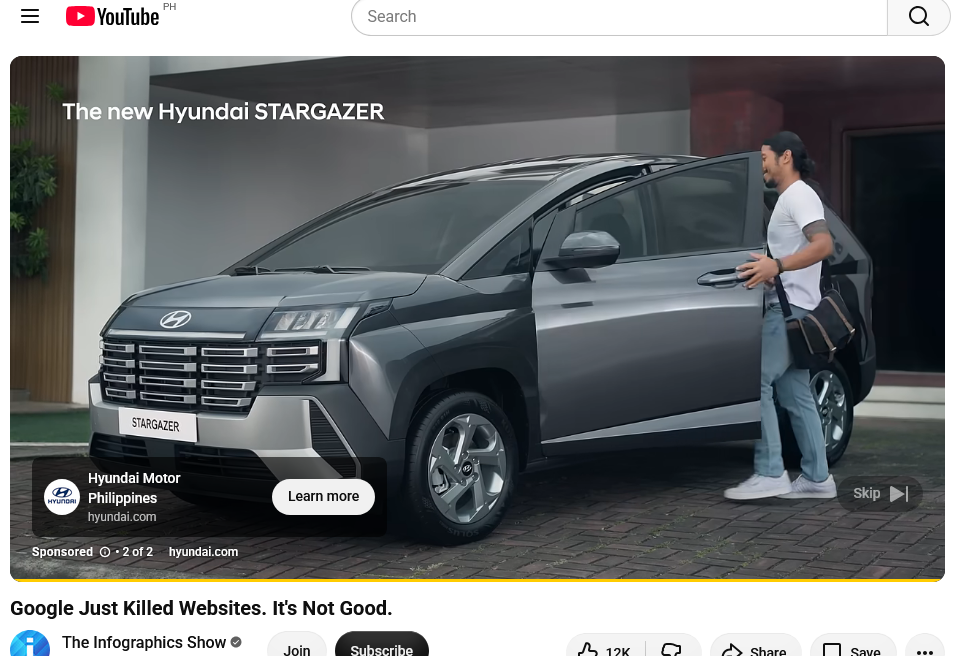
These ads will interrupt your content in some way. On YouTube, for example, ads play before and during a video. On a blog, a display ad can appear on top of the article or off to the side, as shown below.
Here are the steps to start showing ads.
Join an Ad Program
First, you will need to join an ad network or partner program. Note that these programs have requirements you must meet to ensure you have a worthwhile audience. If you don’t see your platform here, that means they don’t offer monetization via ads.
| Platform | Ad program | Requirements |
|---|---|---|
| Blogging | An ad network like Google AdSense | See Google’s Publisher Policies |
| YouTube | YouTube Partner Program | 1,000 subscribers AND either: 4,000 watch hours in past year OR 10 million Shorts views in past 90 days |
| Podcasting | Join your hosting provider’s ad network like the Spotify Partner Program | Depends on the provider hosting your podcast |
| Content Monetization Program | Invite-only | |
| Use the Monetization tools if eligible | See full requirements here | |
| Snapchat | Monetization Program | Invite-only |
⚠️ Important: Starting February 1, 2027, the YouTube Partner Program requirements will be doubled to 8,000 watch hours in the past year OR 20 million Shorts views in the past 90 days.
It might be obvious, but it’s worth reiterating: keep your content clean and family-friendly. Most ad network policies are strict about this, regardless of what platform you’re on.
After you join, you will wait for approval. Once you’re approved, you’re ready to enable showing ads. For a blog, you’ll need to paste HTML code, and for YouTube and other social networks, you simply enable a toggle to allow ads on your content.
Customize Your Ads
If you’re able to, I suggest customizing the way ads appear on your content. Many people, myself included, find too many ads to be annoying. For this reason, limit how many ads your audience sees.
And try not to think that fewer ads = less money. In fact, I think people are more likely to interact with an ad if it blends in well with your content. Too many ads can be intrusive and ruin the vibe of your content.
If you’re running a blog with AdSense, try running experiments between two different ad layouts, and let AdSense automatically apply the winning layout (the layout that your readers respond to better).
How Much You Will Make
The amount you earn from ads depends on how much the advertiser pays to display their ads. This in turn depends on multiple factors like your niche, where your audience is from, and how your audience engages with the ads. So, the amount you earn changes for every ad that appears on your content.
You can view how much you’ve earned from ads in your ad network or partner program’s dashboard.
3. Creator Fund Bonuses
Pros ✅
- Simple and easy to set up
- No need to partner with brands
Cons ❌
- You must post content consistently
- Not every platform offers this
- Your earnings tend to be low
Some social media platforms will pay you just for being an active creator on their platform. It’s their way of saying thank you for your work because, without creators like you, they can’t make money themselves.
However, to apply for the fund, you must meet certain requirements to prove you’re an active creator. For example, check if your country is listed, as many platforms only pay creators in certain countries.
Platforms that Offer Creator Fund Bonuses
Here are three social media platforms that offer you money for being an active content creator. To get creator bonuses, you’ll need to join their monetization program and follow their requirements.
| Platform name | Monetization program | Requirements |
|---|---|---|
| YouTube (Shorts only) | Shorts Bonus Program | Invite-only |
| Content Monetization Program | Invite-only | |
| Bonuses | See full requirements | |
| TikTok | Creator Rewards Program | See full requirements |
How Much You Will Make
The amount you earn from a creator fund will, of course, depend on the platform.
- YouTube’s Shorts bonus program article states that you must post a certain number of Shorts before the end of each month to get paid. The amount you earn is based on how much engagement your Shorts get.
- According to Facebook, legitimate views and authentic engagement can result in higher earnings. To make the most money, Facebook recommends these best practices.
- Instagram says how much they pay you depends on how many qualifying views you get on your bonus-activated Reels, carousels, and image posts.
- TikTok offers two types of earnings: a base payout for qualifying views and a bonus reward if your content gets strong viewer engagement. To earn more, TikTok suggests “posting high-quality content that keeps viewers engaged.”
4. Fan Funding
Pros ✅
- Receive donations from viewers
- Some fans will give you monthly or yearly
- A great way to build community
Cons ❌
- You may feel pressure to create more content for paying subscribers
- Earnings can be unpredictable
- Platform fees are deducted from donations
Fan funding means you receive money from your followers. If you allow fan funding, they can choose to send a one-time donation as a show of support. Think of it like receiving tips (gratuities).
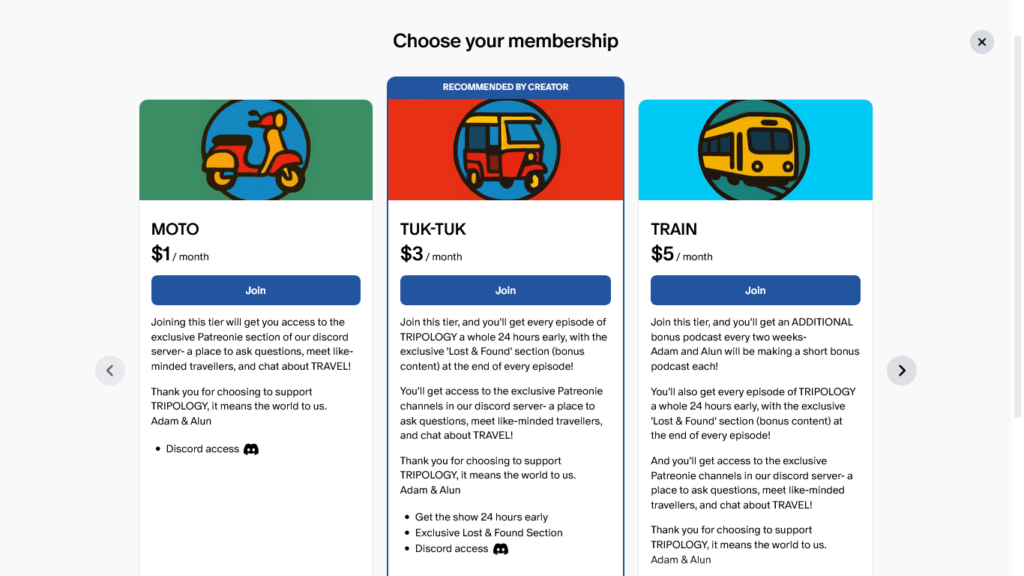
You can also set up subscriptions. This means you offer benefits to those willing to donate a certain amount to you monthly or yearly. These benefits can include member-exclusive content, a private community, access to upcoming content, and an email newsletter.
Platforms that Offer Fan Funding
YouTube and other social media platforms have built-in fan funding features. These let you accept donations from viewers and offer benefits in exchange for recurring donations.
| Platform | For donations | For subscriptions |
|---|---|---|
| YouTube (Partner Program) | Super Chats, Stickers, Thanks, and Rubies received from Gifts | Channel membership |
| Stars | Subscriptions | |
| Gifts & Badges | Subscriptions | |
| TikTok | Diamonds received from Gifts | Subscriptions |
| X (Twitter) | N/A | Subscriptions |
Membership Platforms
Membership platforms like Patreon allow you to create a dedicated page for your followers outside your social media channel. These platforms are also perfect for bloggers and podcasters who don’t have built-in monetization tools. Ko-fi and Buy Me a Coffee offer lower platform fees than Patreon, allowing you to keep more of what your audience gives you.
How Much You Will Make
The answer may seem simple: however much your fans give you. While that may be true, platform fees and other deductions may apply. To know your actual earnings, check your creator dashboard.
5. Brand Partnerships
Pros ✅
- Some brands offer high payment
- Influence how people view a brand
- You can scale your income
Cons ❌
- Your content must meet requirements
- You must communicate professionally
- Work can be time-consuming
A brand partnership is where you post sponsored content on behalf of a brand. Many people also call this “influencer marketing.”
Partnerships allow brands to seek out potential customers from your audience. Since your audience trusts you, brands will ask you to promote them with your personality, as long as you follow their requirements.
Don’t confuse partnerships with UGC (user-generated content). UGC means you’re a freelancer creating content for a brand to use in its own advertising. Partnerships let you use your existing content channel.
Here’s how a brand partnership works:
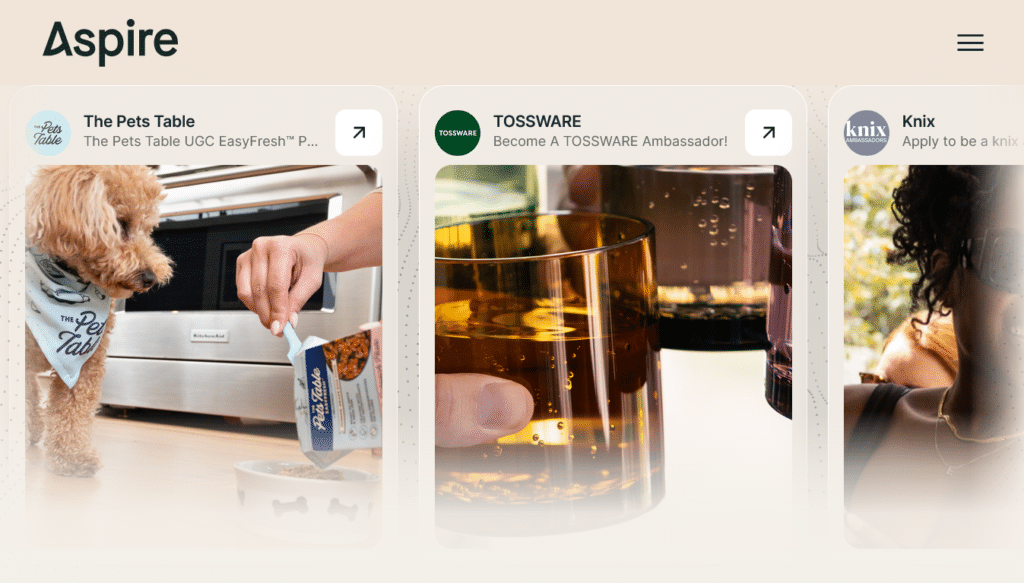
- You join a marketplace where brands can search for you.
- Either they invite you into a partnership or you apply to partner with a brand.
- If you and the brand accept, the brand will give you the requirements for your content.
- You create and publish the content promoting the brand as instructed.
- On a blog or podcast, you must say the content is sponsored. Social media platforms, meanwhile, may add a banner to your video showing the name of your sponsor.
- You send the brand a link to your content. If they approve, you get paid.
Platforms that Offer Brand Partnerships
Here’s how you can partner with brands on each platform.
| Platform | Join this marketplace for brand partnerships |
|---|---|
| Blogging | GetBlogged |
| YouTube, X, or Pinterest | Later, Collabstr, Upfluence, Aspire, or IZEA |
| Podcasting | Podcorn, Gumball, or RedCircle |
| Partnership Ads inside Facebook | |
| Partnership Ads inside Instagram | |
| TikTok | Creator Marketplace inside TikTok One |
| Snapchat | Brand Partnerships inside Snapchat |
How Much You Will Make
You earn however much the brand is willing to pay for the partnership.
6. Email Newsletters
Pros ✅
- Keep in touch with your audience
- Inform your subscribers about new content
- Earn from emails in addition to your content
Cons ❌
- You must pay monthly for email software
- You need to be mindful of users’ data
- Work can be time-consuming
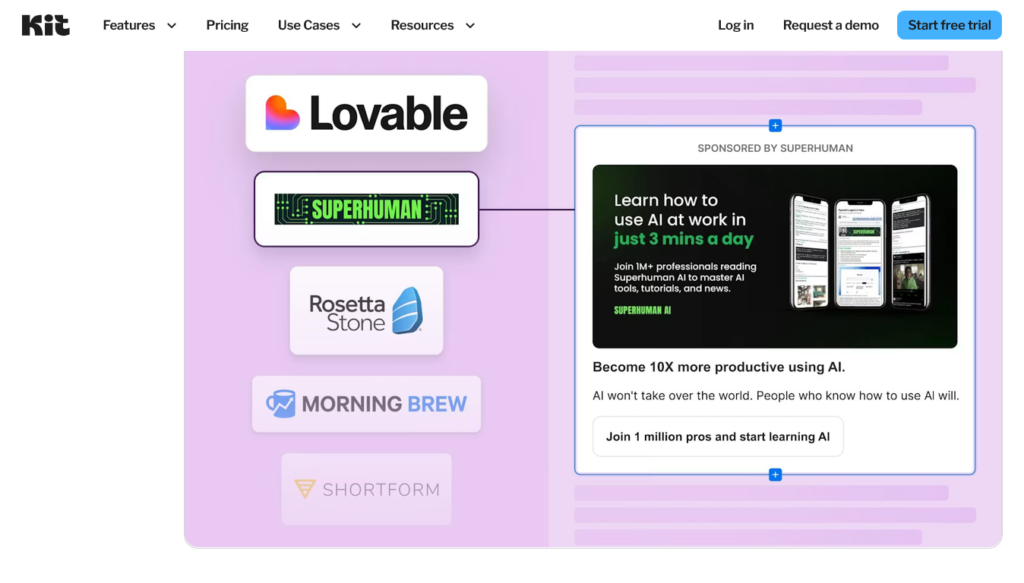
Email newsletters allow you to build an email list of your loyal followers by offering them short, personalized messages. You can talk about new content you published, give advice, or just ask what’s up. The simplest way to make money with email newsletters is by adding sponsored ads.
First, you need email software to create sign-up forms for your followers and help you send those emails. There are several out there, but for beginners, I recommend Kit. They offer a 14-day free trial, and they won’t ask for your credit card. After the trial, downgrade to the free Newsletter plan and only upgrade once your list gets bigger.
Follow these steps to set up email newsletters with Kit and make money:
- Design a landing page for your visitors to sign up to your email list.
- Under Automation, write a welcome email and schedule it to send whenever someone subscribes.
- In your next piece of content, talk about your email list and what benefits viewers will get from signing up.
- Send short email newsletters whenever you like under Broadcasts.
- Set up payments for your Kit account (you’ll need Stripe for this).
- Go to Earn > Newsletter Sponsorships to start showing sponsored ads.
How Much You Will Make
You earn however much the brand is willing to pay for a sponsored ad.
Conclusion
And there you have it: how to become a content creator and make money.
As you can probably tell, content creation takes a lot of time. You need to build your content library, wait for followers to show up, and experiment with the different ways to monetize.
So, if you need a little bit of extra money while you wait, consider checking out paid survey sites or user testing opportunities. They are free and simple to get started. But remember: they likely won’t replace a full-time income.
Or for a deeper dive, check out my platform-specific guides:
I wish you all the best in your journey to making money as a content creator.
Thanks for reading and happy earning!
Content Monetization FAQ
Content monetization is the process of turning your content into assets that make you money. Unlike task-based hustles that pay you for every task you complete, monetized content pays you whenever someone engages with your content. Building a brand and an audience are crucial before you can make money as a content creator.
As a beginner, focus on building an audience with high-quality content. Once you have an active community, start with fan funding and showing ads if possible. To maximize your income, consider affiliate marketing and partnering with brands.
Any type of content can technically be monetized. However, if you’re on YouTube or social media, platforms and brands have requirements you must meet before they can pay you for your content. These include a certain follower count, living in a certain country, and getting enough engagement on your existing content.
Yes. YouTube’s AI disclosure article says that an AI disclosure doesn’t affect a YouTube video’s ability to earn money. I saw an AI-generated video myself on YouTube and encountered ads while watching it.
For bloggers, I recommend Google AdSense. If you’re a podcaster, join the ad network offered by your podcast hosting. YouTube and other social media platforms also have their own ad programs you can join as long as you meet their requirements.

Hey, it's Matthew! I enjoy computers, so when I discovered making money online in 2017, I knew I had to try. Over time, I made hundreds of dollars taking surveys and doing user testing. Today, I continue looking for simple ways to earn online and share what I learn here on WebCents.